


Everything about Screen Printer Mesh
Screen printing mesh count is measured in threads per inch (TPI) or threads per centimeter (TPC). A higher mesh count will produce finer detail and a softer print quality, with less amount of ink, while a lower mesh count will allow you to print more, thicker, or ink with larger particles inside, such as glitter. The mesh recommendation is still based on the ink you are using.
Test Your Knowledge on Mesh Count
The Screen Printing Mesh Count Chart is a crucial reference for those in the screen printing industry, aimed at delivering optimal print outcomes. This information provides invaluable guidance on selecting the most suitable mesh count for every individual print job. The chart provides detailed mesh count conversions which may vary slightly but are closely aligned with the industry’s standards.

Screen Printing Mesh Types
Screen printing mesh is a type of material used in the process of screen printing. It is used to transfer ink or paint onto a substrate, such as fabric, paper, or plastic. The mesh is usually made of polyester, nylon, or stainless steel and is available in a variety of sizes and different mesh counts.
The most common types of screen printing mesh are plain weave, satin weave, and twill weave. Plain weave is the most commonly used type of mesh and is best used for printing on paper and other substrates with a consistent surface.
For us screen printers, we will be working with plain weave polyester mesh. But no matter what type of mesh count you choose, it is important to ensure that the mesh is properly stretched and tensioned. This will help ensure that the ink or paint is transferred evenly across the substrate and that the image is sharp and clear.
The suffixes S, T, HD, and HD Super are used to describe the thread diameter, with T=Mesh being the most common for textile printing while S is usually used for serigraphs. HD and HD Super are suitable for heavier-duty applications.
S, T, HD, and HD Super; These Mesh suffixes relate to the thread diameter
- “S” or “Serigraphic grade”
- “T” means “Textile grade”
- No need for us- just for the records, HD has heavy-duty applications and HD super it’s even heavier-duty.
Despite the name “Serigraphic”, the most commonly used of these meshes is T for screen printing on garments.
Screen Printing Mesh Count used
Most screen printing mesh falls into one of three classifications.
- The ideal mesh count for a very heavy deposit, the quality of the outline is not important Under 45-110 inches (18-43cm)
- Heavy deposit, good definition 110–195 inch (43 – 77 cm)
- Thin deposit, extra-fine detail, and fine lines 195–355 inches (77 -140cm)
Of the four mesh suffixes, S (serigraphic), T (textile), HD (heavy duty) and HD Super (even heavier duty). These refer to the thread diameter, with S and T being the most commonly used for garments. For very heavy soiling, where the definition is not important, a mesh size of 18-43cm (45-110 inches) should be used. For more ink deposits, good definition, a mesh between 110-195 inches (43-77cm) is ideal. And for thin deposits, extra fine detail, and fine lines, a common mesh is between 195-355 inches (77-140cm) should be used. Special effect inks such as sparkle or glitter inks require a mesh of 18-30cm (7-10in) as they contain particles that cannot pass through a finer mesh. Finally, puff inks should be printed with a mesh of 43cm, to get a good amount of ink deposit.
The elasticity should allow it to return to its original state after the Screen Printer Squeegee has passed. This should allow complete ink removal from the open mesh while maintaining the integrity of the printed surface. Screen mesh count, on the other hand, is defined as the number of threads per centimeter, thread diameter, mesh size, open area or surface area, and fabric thickness.
Mesh Thread Diameter vs. Ink Deposit
Ink transfer to the substrate is a critical element in printing fine detail. To ensure a successful transfer, it is necessary to increase the area of the substrate and reduce the filament weight and stencil thickness.

The use of emulsion over mesh (EOM) also plays a role. The use of an S-Mesh, which is much thinner and not so common mesh, results in a larger opening with less EOM, allowing the ink to be released to capture finer details and provide greater ink deposition. (see picture above)

As we use the T mesh mainly for screen printing and you understand the above. Would it make sense to use an S mesh? Yes, of course! An S mesh is much finer, so we have a larger opening and less EOM.
We normally use T mesh, but S mesh can be used for under-bases or more delicate designs, but remember the S-Meshit is much more sensitive.

Check out this informative video to see the key differences between T-mesh and S-mesh for screen printing. It’s a quick tutorial that will help you decide which mesh type is best for your printing need
Yellow Mesh Benefits Exposed

You will even see the yellow mesh, but why is it yellow?
Firstly, a direct stencil is irradiated with UV light to cure the illuminated areas.
When exposed, light passes through the emulsion of the screen and is reflected at the surface of the fabric. Light is also transmitted through the mesh itself, causing even more undercutting. Light rays that hit the white mesh of the mesh are reflected and scattered under the black edges of the film, causing the master to be underexposed. This can cause thin lines or halftone dots to become even thinner or not appear in the stencil at all. To avoid this, a complementary colour should be used that absorbs the necessary wavelengths. Tests have shown that a warm yellow colour is the most effective absorber.
Therefore, the use of a yellow mesh should help to prevent light from scattering or passing under the black film so that sharp outlines are not produced.
Stretching the Screen Printer Mesh

The fabric must be stretched evenly to ensure perfect uniformity during printing. A mechanical stretching device is advantageous for this process. It can be done by hand, but this is not an option for a professional screen printer.
Pneumatic systems are usually used for tensioning. These have a series of cylinders that exert the same pull in all directions, up, down, right, and left.

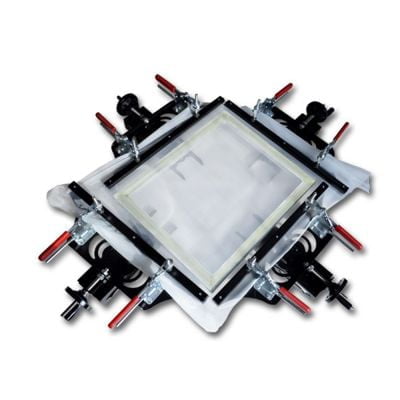
Manual Pneumatic Stretcher
But my favorite is this
Yes, I know many will say the pneumatic is much better, but I feel I have more control over this. And fewer parts to break, so this is a personal favorite for stretching the Mesh, a simple manual device.
A word of advice: when stretching your frame, do not do it too quickly. Don’t try to pull all at once. Go slowly, pull, let it rest, pull, let it rest, until you have the Newton you want. Give it some time!
How many newtons should a screen printer screen be stretched with?
The newton (symbol: N) is the International System of Units (SI) The newton (symbol: N) is a unit of force derived from the International System of Units (SI). One newton is the force required to accelerate one kilogram of mass at a rate of one metre per second squared in the direction of the applied force. WIKIPEDIAderived unit of force. One newton is the force needed to accelerate one kilogram of mass at the rate of one meter per second squared in the direction of the applied force. WIKIPEDIA
The unit of measurement for stretching screen mesh is called Newton. And this depends on the mesh you are using. A T mesh can take more Newton than an S mesh, because we have learned that the diameter of the fibre is thicker. But not all T-mesh get the same amount of newton when we stretch the mesh. Generally speaking, so the finer mesh count, the less Newton it can hold.
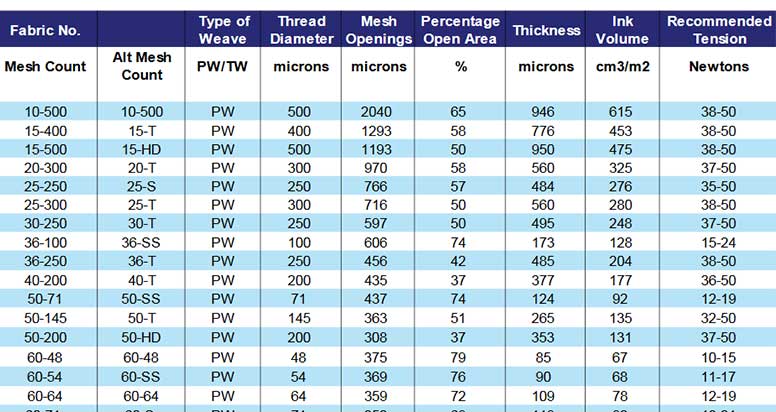
The chart shows the Fabric No, Type of Weave, Thread Diameter, Mesh Openings, Percentage Open Area, Thickness, Ink Volume, and Recommended Tension. A reputable mesh supplier will provide you with a mesh guide like the one above. It will tell you what percentage of mesh opening it has and how many Newtons it can hold.
Please ask for this and do not just blindly push your net to 40 Newtons as I often hear that 40 Newtons would be good. My belief is that anything over 20 newtons will work well, and less than that will cause some problems with registration and sharpness. But please follow your supplier’s guidelines for different mesh counts.
How to measure Newton on your Screen

To measure newtons, you will need a newton meter. Place it on the corners of the mesh and take a reading. Be careful when using the tool as it can easily be dropped and broken.

Printing Mesh Adhesives

There are many choices when it comes to choosing a mesh adhesive. From the economical PATEX liquid contact adhesive to the high-end specialty adhesive that is highly resistant to chemicals and dries quickly in 30 minutes or less.
It is important to ensure that the adhesive is able to penetrate the fabric and form a strong bond with the screen and frame, which can be difficult with thick liquid adhesives. High-performance adhesives are clearly advantageous and should be your priority. Remember that you need a minimum of 20 Newtons of tension to secure the fabric properly, otherwise you may need to replace the fabric and repeat the process, which can be costly.
What Screen Printing Frames to use

If you are considering investing in screen printing frames, it is recommended that you choose aluminum frames as they are durable and resistant to breakage, bending and corrosion. Pay attention to the thickness, as an aluminum frame that is too thin may bend when the mesh is stretched over it. Wooden frames may be a viable option if you are an occasional hobbyist, but they are not as reliable in the long term. Investing in an over 3.5×3.5cm diameter aluminum frame is a worthwhile investment as it will last a lifetime.


Screen Printing Mesh Calculator Chart what is it
The mesh calculator is an excellent tool to show the mesh count of your mesh, in a chart on the film. By turning the Mesh calculator on the mesh and a star will appear to indicate the number of mesh counts. It can be difficult, if not impossible, to determine the mesh count without this calculator, as it is difficult to see with the naked eye.

As you move the film over the mesh, a star will appear to indicate the number of counts.
Moire effect and how to prevent it

When halftones and mesh are combined, Moire interference is seen. To reduce this effect, films should be created using a RIP program, with halftones positioned at a certain angle and having four or more open mesh areas for each halftone point. Here are additional details on What are Halftone Moire patterns.
Mesh Count Conversion Chart:
| Threads per inch | Threads per centimeter |
| 45 Mesh Count | 18 Mesh |
| 76 Mesh Count | 30 Mesh Count |
| 110 Mesh Count | 43 Mesh Count |
| 137 Mesh Count | 54 Mesh Count |
| 156 Mesh Count | 61 Mesh Count |
| 195 Mesh Count | 77 Mesh Count |
| 230 Mesh Count | 90 Mesh Count |
| 305 Mesh Count | 120 Mesh Count |
| 355 Mesh Count | 140 Mesh Count |
Mesh Count Summary
Screen printing mesh is an important factor in the printing process as it affects the accuracy and quality of the printed result. It is important to select the right type of mesh to meet the requirements of the job. The mesh count should be determined by considering the number of threads per centimeter, thread diameter, mesh size, open area, and fabric thickness. Polyester mesh is the recommended type for screen printing as it has greater tension and absorbs less moisture than nylon mesh. It is important to ensure that the screen printing mesh is properly tensioned and that the correct adhesive is used. A higher mesh count screen means finer details, whereas a higher mesh count means more ink deposit. Finally, the use of a yellow mesh can help prevent light from scattering or passing under the black film.


The information you give us has really help us and you have make your mark in so many people .
It’s a wonderful work fir the next generation yet unborn
Thank so much
Great & Thanks to let me know!
nice, I have need printing mesh would you help for proquirment
Sure, send me a mail, thanks